Booting Syluxium
The boot picker
Section titled “The boot picker”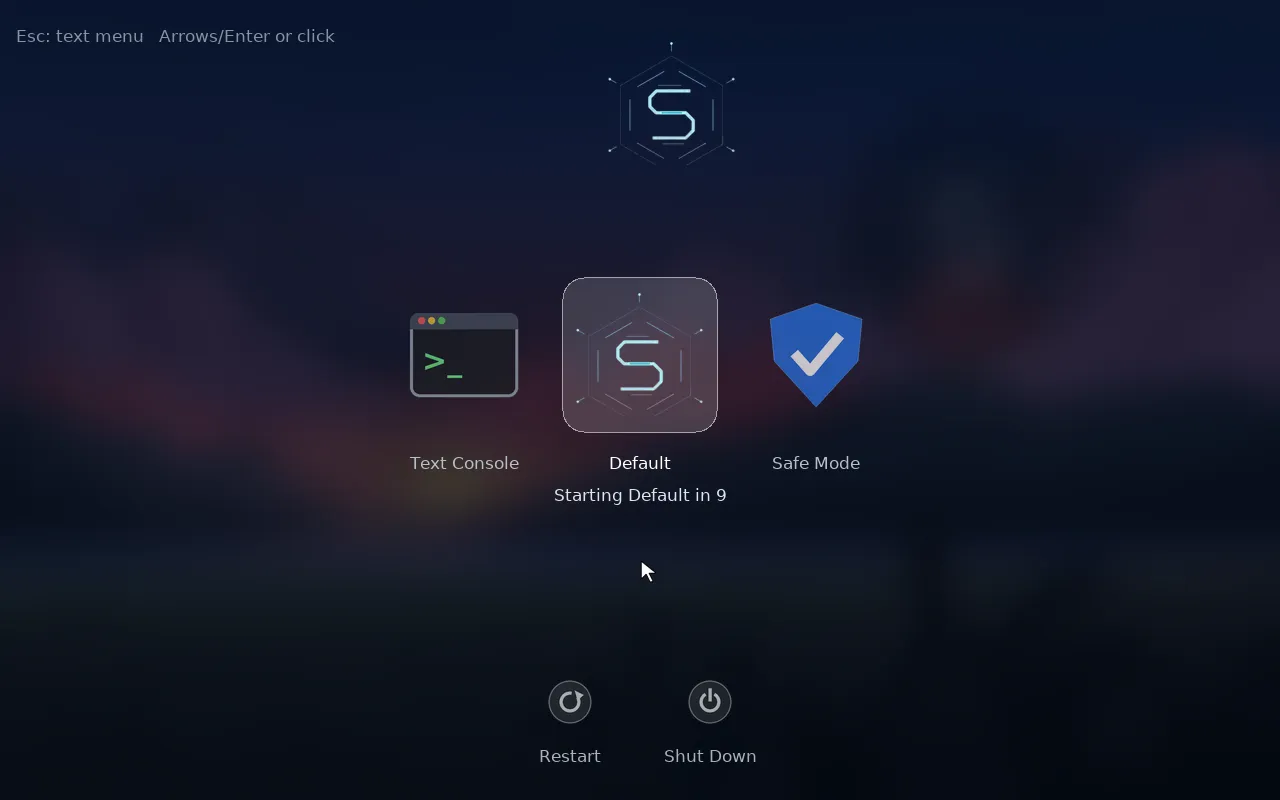
On UEFI computers a graphical boot picker appears first. It shows large icons for Text Console, Default and Safe mode, plus any Windows, macOS or Linux it finds on the disks.
- Arrow keys and Enter, or the mouse, choose an entry.
- Esc shows every entry as a text list, including the ones below.
On older BIOS computers the boot menu appears as a text list, with the same entries.
After you choose, Syluxium’s loading screen shows the logo and a progress bar while the system starts, then the login screen. Shutting down or restarting shows a matching screen (“Shutting down” or “Restarting”) until the power goes off. Pressing the computer’s power button shuts down cleanly.
Boot options
Section titled “Boot options”Advanced users can add options to an entry’s command line:
| Option | Effect |
|---|---|
nonvidia |
Use nouveau instead of NVIDIA’s own driver |
novaapi |
Turn off hardware video decoding on AMD graphics |
nomodeset |
No graphics drivers (what safe mode uses) |
Boot entries
Section titled “Boot entries”| Entry | What it does |
|---|---|
| Syluxium | Normal start, straight to the login screen and the desktop. The graphics drivers (AMD, Intel, NVIDIA) load automatically. |
| Syluxium (safe mode: no GPU drivers) | Starts without the graphics drivers. Use it when the screen stays black or the picture is wrong. |
| Syluxium (text console) | A text-mode console, no desktop. Shows the boot messages as the system starts. |
| Syluxium (Recovery) | Repair disks and packages, reset settings or passwords, administrator prompt. See Updates & recovery. |
| Syluxium (Wayland desktop preview) | The native Wayland desktop with glass effects (preview). |
| Syluxium (in memory: whole system in RAM) | Loads the whole system into RAM. Slower to start and needs about 3 GB of extra RAM; meant for sticks whose system partition is damaged. |
Display problems
Section titled “Display problems”If the screen stays black, flickers or shows the wrong resolution, restart and choose Syluxium (safe mode: no GPU drivers). Then report the problem with the log from the stick, so the driver issue can be fixed.
© 2026 Syluxium Industries LLC · Founded in 2023